
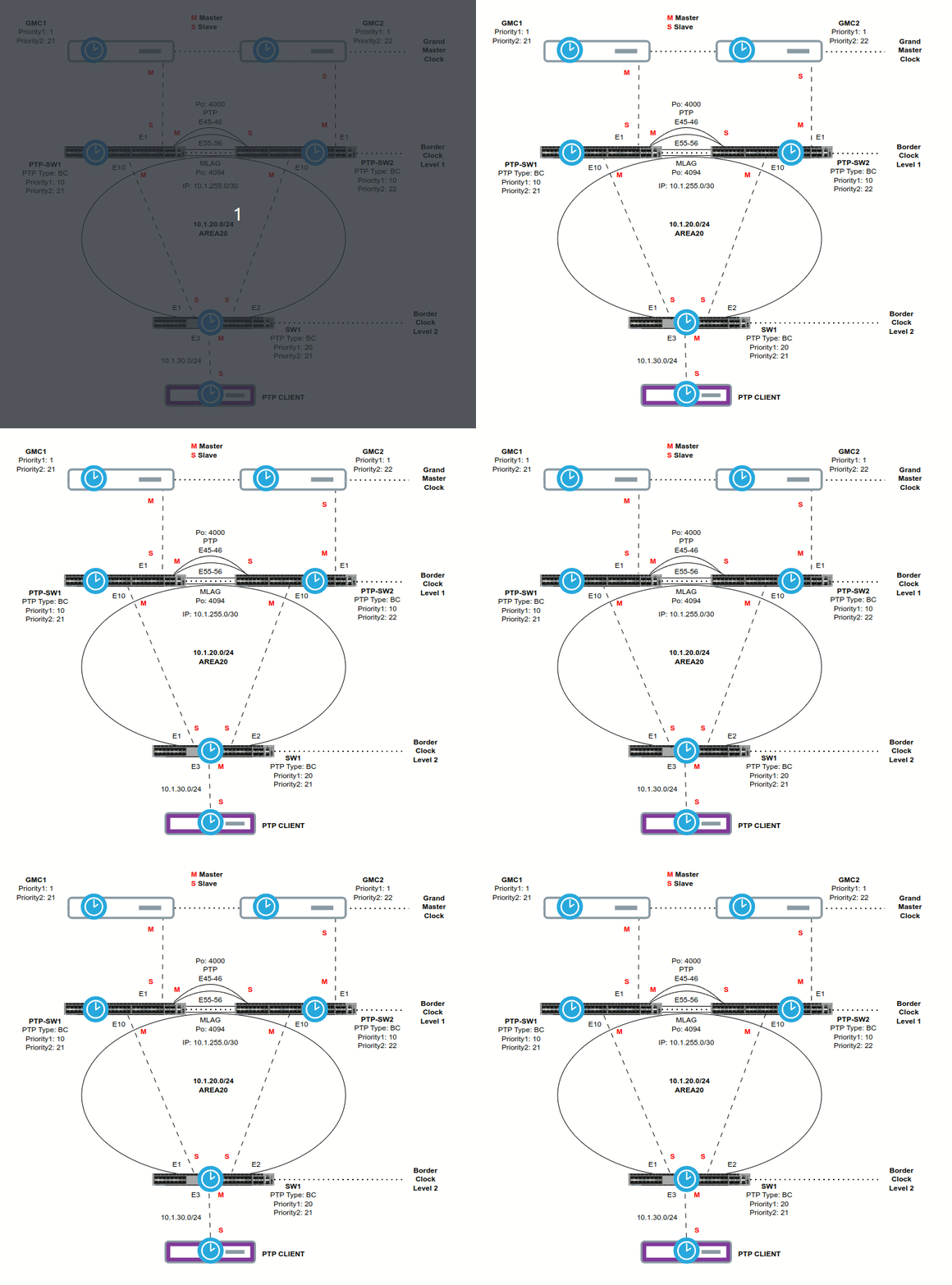
Network Topology
Brief Description:
With this configuration, the network achieves full high availability (HA). PTP communication will continue even if either the GMC or PTP switches fails.
The PTP server is configured as the Grand Master Clock (GMC), with parameters matching those of the Arista configuration.
Configuration Parameters (IEEE1588-2008 profile):
- Operating Mode: PTPv2 One-Step
- Network Protocol: UDP/IPv4 L3
- GMC1 IP: 10.1.10.101/24
- GMC2 IP: 10.1.10.102/24
- GMC GW: 10.1.10.1
- PTP Mode: Multicast Master
- Delay Mechanism: E2E
- PTP Domain: 10
- GMC1 Priority1: 1 and GMC2 Priority1: 1
- GMC1 Priority2: 11 and GMC Priority2: 12
- Announce Interval: 1 per 2 sec
- Sync Interval: 1 per 1 sec
- Delay Request: 1 per 1 sec
- Announce Receipt Timeout: 4 sec
Layer 2: Configured with Port-Channel, MSTP, and MLAG. In the Po20 interface, the native VLAN must be the one where the Grand Master Clock (GMC) is located.
Layer 3: Configured with OSPF and VRRP. In my setup, SW1 is configured as an OSPF Totally Stub Network, as it doesn’t need to receive all subnets.
Layer 3: Multicast configuration with Multicast IP 224.0.1.129
Management IP addresses: PTP-SW1 (10.1.255.5) <–> PTP-SW2 (10.1.255.6).
GMC1 serves as the primary Grand Master for the entire network at the first level, while GMC2 acts as the secondary Grand Master.
PTP-SW1, PTP-SW2, and SW1 function as Boundary Clocks (BC). PTP-SW1 is the Master Clock for BC Level 1, while PTP-SW2 serves as the secondary Master Clock based on priority1 and priority2 settings.
SW1 acts as the Master Clock BC Level 2.
PTP-SW1 and PTP-SW2 form an MLAG cluster.
Ethernet interfaces E55 and E56 are dedicated for MLAG connectivity.
Ethernet interfaces E45 and E46 are utilized for PTP communication, which is essential for high availability (HA).
####### PTP-SW1 #######
!
conf t
!
hostname PTP-SW1
!
ptp clock-identity 00:3a:2b:ff:ff:1c:10:21
ptp mode boundary one-step
ptp domain 10
ptp priority1 10
ptp priority2 21
ptp source ip 10.1.254.21
ptp ttl 4
!
vlan 10
name GMC
!
vlan 20
name PTP-SW1-CON
!
vlan 4090
name MLAG-PTP
!
vlan 4094
name MLAG
trunk group MLAGPEER
!
interface Port-Channel4094
description MLAG
switchport mode trunk
switchport trunk group MLAGPEER
!
interface Ethernet55/1
description PTP-SW2-E55/1
channel-group 4094 mode active
!
interface Ethernet56/1
description PTP-SW2-E56/1
channel-group 4094 mode active
!
interface Port-Channel20
description to-SW1
switchport trunk native vlan 20
switchport trunk allowed vlan 10,20
switchport mode trunk
mlag 20
ptp enable
ptp announce timeout 2
ptp delay-req interval 0
ptp role master
!
interface Ethernet20
description to-SW1
channel-group 20 mode active
ptp enable
ptp announce timeout 2
ptp delay-req interval 0
ptp role master
!
interface Port-Channel4090
description MLAG-PTP
no switchport
ptp enable
ptp announce timeout 2
ptp delay-req interval 0
!
interface Ethernet45
description MLAG-PTP
no switchport
channel-group 4090 mode active
ptp enable
ptp announce timeout 2
ptp delay-req interval 0
!
interface Ethernet46
description MLAG-PTP
no switchport
channel-group 4090 mode active
ptp enable
ptp announce timeout 2
ptp delay-req interval 0
!
interface Ethernet1
description GMC1
mtu 1500
switchport mode access
switchport access vlan 10
ptp enable
ptp announce timeout 2
ptp delay-req interval 0
spanning-tree portfast
spanning-tree bpdufilter enable
!
interface Loopback0
description PTP-Source
ip address 10.1.254.21/32
ip ospf area 0.0.0.0
!
interface Vlan10
ip address 10.1.10.2/24
ip ospf priority 255
ip ospf area 0.0.0.0
pim ipv4 sparse-mode
vrrp 10 priority-level 120
vrrp 10 ipv4 10.1.10.1
!
interface Vlan20
ip address 10.1.20.1/24
ip igmp static-group 224.0.1.129
ip ospf priority 255
ip ospf area 0.0.0.20
pim ipv4 sparse-mode
!
interface Vlan4094
ip address 169.254.0.0/31
no autostate
!
ip routing
!
mlag configuration
domain-id MLAG2413
local-interface Vlan4094
peer-address 169.254.0.1
peer-link Port-Channel4094
!
router multicast
ipv4
routing
!
router ospf 1
router-id 1.1.10.21
area 0.0.0.20 stub no-summary
graceful-restart
!
router pim sparse-mode
ipv4
rp address 10.1.254.21
rp address 10.1.254.22 priority 10
!
end
####### PTP-SW2 #######
!
conf t
!
hostname PTP-SW2
!
ptp clock-identity 00:3a:2b:ff:ff:1c:10:22
ptp mode boundary one-step
ptp domain 10
ptp priority1 10
ptp priority2 22
ptp source ip 10.1.254.22
ptp ttl 4
!
vlan 10
name PTP-SERVER
!
vlan 20
name PTP-SW-CON
!
vlan 4090
name MLAG-PTP
!
vlan 4094
name MLAG
trunk group MLAGPEER
!
interface Port-Channel4094
description MLAG
switchport mode trunk
switchport trunk group MLAGPEER
!
interface Ethernet55/1
description PTP-SW1-E55/1
channel-group 4094 mode active
!
interface Ethernet56/1
description PTP-SW1-E56/1
channel-group 4094 mode active
!
interface Port-Channel20
description to-SW1
switchport trunk native vlan 20
switchport trunk allowed vlan 10,20
switchport mode trunk
mlag 20
ptp enable
ptp announce timeout 2
ptp delay-req interval 0
ptp role master
!
interface Ethernet20
description to-SW1
channel-group 20 mode active
ptp enable
ptp announce timeout 2
ptp delay-req interval 0
ptp role master
!
interface Port-Channel4090
description MLAG-PTP
no switchport
ptp enable
ptp announce timeout 2
ptp delay-req interval 0
!
interface Ethernet45
description MLAG-PTP
no switchport
channel-group 4090 mode active
ptp enable
ptp announce timeout 2
ptp delay-req interval 0
!
interface Ethernet46
description MLAG-PTP
no switchport
channel-group 4090 mode active
ptp enable
ptp announce timeout 2
ptp delay-req interval 0
!
interface Ethernet48
description PTP SERVER
mtu 1500
switchport mode access
switchport access vlan 10
ptp enable
ptp announce timeout 2
ptp delay-req interval 0
spanning-tree portfast
spanning-tree bpdufilter enable
!
interface Loopback0
description PTP-Source
ip address 10.1.254.22/32
ip ospf area 0.0.0.0
!
interface Vlan10
ip address 10.1.10.3/24
ip ospf priority 255
ip ospf area 0.0.0.0
pim ipv4 sparse-mode
vrrp 10 priority-level 115
vrrp 10 ipv4 10.1.10.1
!
interface Vlan20
ip address 10.1.20.2/24
ip igmp static-group 224.0.1.129
ip ospf priority 255
ip ospf area 0.0.0.20
pim ipv4 sparse-mode
!
interface Vlan4094
ip address 169.254.0.1/31
no autostate
!
ip routing
!
mlag configuration
domain-id MLAG2413
local-interface Vlan4094
peer-address 169.254.0.0
peer-link Port-Channel4094
!
router multicast
ipv4
routing
!
router ospf 1
router-id 1.1.10.22
area 0.0.0.20 stub no-summary
graceful-restart
!
router pim sparse-mode
ipv4
rp address 10.1.254.21 priority 10
rp address 10.1.254.22
!
end
######### SW1 ##########
!
conf t
!
hostname SW1
!
ptp clock-identity 00:3a:2b:ff:ff:1c:20:21
ptp mode boundary one-step
ptp domain 10
ptp priority1 20
ptp priority2 21
ptp source ip 10.1.255.101
ptp ttl 4
!
vlan 30
name SERVER
!
interface Ethernet1
description SERVER
switchport access vlan 30
ptp enable
ptp announce timeout 2
ptp delay-req interval 0
ptp role master
spanning-tree portfast
spanning-tree bpduguard enable
!
interface Port-Channel49
description PTP-SW
switchport trunk native vlan 20
switchport trunk allowed vlan 10,20
switchport mode trunk
ptp enable
ptp announce timeout 2
ptp delay-req interval 0
!
interface Ethernet49
channel-group 49 mode active
ptp enable
ptp announce timeout 2
ptp delay-req interval 0
!
interface Ethernet50
channel-group 49 mode active
ptp enable
ptp announce timeout 2
ptp delay-req interval 0
!
interface Loopback0
ip address 10.1.255.101/32
ip ospf area 0.0.0.20
!
interface Vlan20
ip address 10.1.20.3/24
ip igmp static-group 224.0.1.129
ip ospf priority 0
ip ospf area 0.0.0.20
pim ipv4 sparse-mode
!
interface Vlan30
ip address 10.1.30.1/24
ip igmp static-group 224.0.1.129
ip ospf area 0.0.0.20
pim ipv4 sparse-mode
!
ip routing
!
router multicast
ipv4
routing
!
router ospf 1
router-id 1.1.20.21
area 0.0.0.20 stub
graceful-restart
!
router pim sparse-mode
ipv4
rp address 10.1.255.21
rp address 10.1.255.22 priority 10
!
end
######## TEST ########
Test on Server:
You will see the GMC and BC addresses, as well as PTP messages. These packets can be captured and analyzed using Wireshark.
Install PTPD Server from (ptpd2 version 2.3.1):
sudo ptpd -C -V -s -E -d 10 -i eth0
############################
######## References ########
Arista Precision Timing Protocol Solution Brief
Arista PTP Best Practices for Media and Entertainment
and Broadcast Centers
 Notes to Myself