
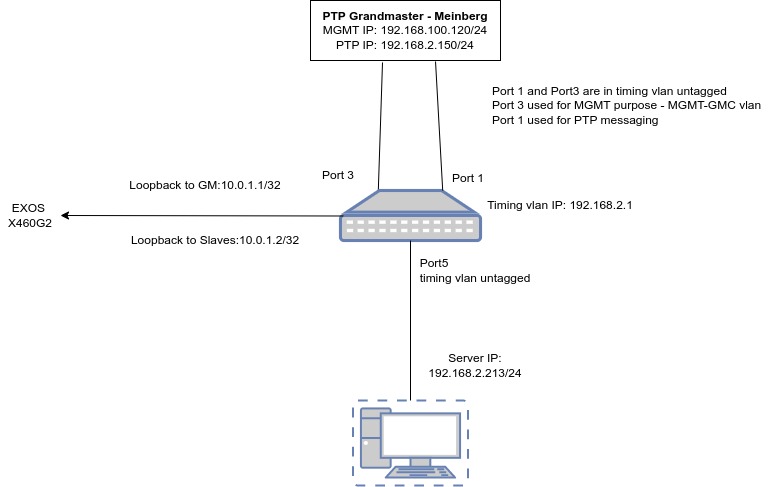
configure vlan default delete ports all
create vlan “lpbk-to-GMC”
configure vlan lpbk-to-GMC tag 10
enable loopback-mode vlan lpbk-to-GMC
create vlan “lpbk-to-Slave”
configure vlan lpbk-to-Slave tag 20
enable loopback-mode vlan lpbk-to-Slave
create vlan “timing”
configure vlan timing tag 99
configure vlan timing add ports 1, 3, 5 untagged
configure vlan timing ipaddress 192.168.2.1 255.255.255.0
enable ipforwarding vlan timing
configure vlan lpbk-to-GMC ipaddress 10.0.1.1 255.255.255.255
enable ipforwarding vlan lpbk-to-GMC
configure vlan lpbk-to-Slave ipaddress 10.0.1.2 255.255.255.255
enable ipforwarding vlan lpbk-to-Slave
enable ospf
configure ospf add vlan lpbk-to-GMC area 0.0.0.0 passive
configure ospf add vlan lpbk-to-Slave area 0.0.0.0 passive
configure ospf add vlan timing area 0.0.0.0
create network-clock ptp end-to-end-transparent
configure network-clock ptp end-to-end-transparent add ports 1,3,5
enable network-clock ptp end-to-end ports 1,3,5
create network-clock ptp boundary
enable network-clock ptp boundary
configure network-clock ptp boundary add vlan lpbk-to-GMC one-step slave-only
configure network-clock ptp boundary delay-request-interval 0 vlan lpbk-to-GMC
configure network-clock ptp boundary sync-interval 0 vlan lpbk-to-GMC
configure network-clock ptp boundary announce interval 1 vlan lpbk-to-GMC
configure network-clock ptp boundary add unicast-master 192.168.2.150 query-interval 1 vlan lpbk-to-GMC
configure network-clock ptp boundary add vlan lpbk-to-Slave one-step master-only
configure network-clock ptp boundary delay-request-interval 0 vlan lpbk-to-Slave
configure network-clock ptp boundary sync-interval 0 vlan lpbk-to-Slave
configure network-clock ptp boundary announce interval 1 vlan lpbk-to-Slave
configure network-clock ptp boundary add unicast-slave 192.168.2.213 vlan lpbk-to-Slave
To Check the show outputs:
sh network-clock clock-source
sh network-clock ptp end-to-end-transparent ports 1-5
sh network-clock ptp boundary time-property
sh network-clock ptp boundary parent
sh network-clock ptp boundary vlan all
sh network-clock ptp boundary vlan all counters
sh network-clock ptp boundary vlan all unicast-master counters
sh network-clock ptp boundary vlan all unicast-slave counters
Capture Debug:
debug packet capture ports 1 on
wait a few minutes then run below command.
debug packet capture ports 1 off
Copy the captured pcap file to my linux laptop:
X460G2-24t-10G4.52 # ls /usr/local/tmp/
-rw-rw-rw- 1 root root 16445 Oct 31 15:16 2022-10-31_15-15-54_rx_tx.pcap
drwx—— 2 root root 1024 Jul 7 11:23 bcmsdk
prw——- 1 root root 0 Nov 1 17:28 bluetooth-avahi
prw——- 1 root root 0 Nov 1 17:28 bluetooth-pipe
-rw-rw-rw- 1 root root 167 Oct 31 15:16 capture.log
drwxrwxrwx 2 root root 1024 Aug 9 12:04 cc_logs
drwxrwxrwx 2 root root 1024 Jul 7 11:23 dhcp
d-w——- 2 root root 1024 Jul 7 11:23 healthcheck
-rw-r–r– 1 root root 78 Oct 31 15:06 memtrcbgp.log
-rw-r–r– 1 root root 6901 Nov 1 14:17 old_traces.tgz
-rw-r–r– 1 root root 0 Nov 1 17:28 pdtrcbgp.log
-rw-r–r– 1 root root 0 Nov 1 15:19 pdtrcbgp.log.save
-rw-rw-rw- 1 root root 51081 Nov 1 17:28 trace.ztpstack.1953
scp2 vr VR-Default /usr/local/tmp/2022-10-31_15-15-54_rx_tx.pcap myuser@192.168.2.213:/home/myuser/Documents/1.pcap
 Notes to Myself