
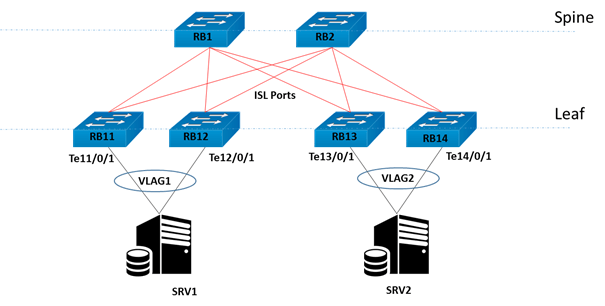
Example VCS Topology:
Things to do before updating:
1) System memory should be at most 70% usage. If it is over 70%, the update should not be done.
RB1-SW# show process memory
Rbridge-id: 1
%Memory Used: 24.0927%; TotalMemory: 6700656 KB; Total Used: 1614368 KB Total Free: 5086288 KB; Low Free: 520424 KB; High Free: 4040236 KB; Cached: 432024 KB
PID Process MEM% VSIZE(KB) RSS(KB) PSS(KB)
3098 Dcmd.Linux.powe 2.70 381140 181092 158286
3327 postgres 2.50 223212 172372 122494
3322 postgres 1.40 155604 100348 54635
2) Principle switch and Multicast Root switch should be detected if the network is large in number.
NOTE: When separating the update groups, the group containing the Principle switch should be updated last.
sh vcs
sh vcs detail
sh fabric route multicast
3) The following configuration must be entered on all Port-Channel interfaces.
“vlag ignore-split” command is very important during update.
int po 8
vlag ignore-split
int po 9
vlag ignore-split
4) Management ports of VDX switches must be connected and configured. Necessary settings should be made for remote connection via SSH.
5) Update can be done over tftp, ftp(s), scp or usb. The server must be installed and ready before the firmware update.
6) The following outputs are taken and checked again after the firmware update.
show run
show version all-partitions rbridge all
show vcs
show fabric all
“show fabric isl“port BW should be same after upgrade.
RB1-SW# show fabric isl
Rbridge-id: 1 #ISLs: 1
Src Src Nbr Nbr
Index Interface Index Interface Nbr-WWN BW Trunk Nbr-Name
———————————————————————————–
250 Fo 1/0/107 250 Fo 2/0/107 10:AA:BB:CC:DD:EE:FF:AA 80G Yes “RB1-SW”
show fabric islports
show port-channel summary
After the update, some port-channel member ports may be down. The status of the port-channel ports should be checked before and after.
RB1-SW# show port-channel summary
Flags: D – Down P – Up in port-channel (members)
U – Up (port-channel) * – Primary link in port-channel
S – Switched
M – Not in use. Min-links not met
===== =============== ========== ===============
Group Port-channel Protocol Member ports
===== =============== ========== ===============
8 Po 8 (SU) vLAG Fo 1/0/97* (P)
Fo 1/0/98 (P)
Fo 2/0/97 (P)
Fo 2/0/98 (P)
9 Po 9 (SU) vLAG Fo 1/0/101 (P)
Fo 1/0/102* (P)
Fo 2/0/101 (P)
Fo 2/0/102 (P)
show ip interface brief rb all
show ip interface brief rb all | ex down
show interface status
In particular, the speeds of the vLAG ports should be checked. vLAG ports should show total port bandwidth.
show mac-address-table dynamic
show mac-address-table count
Firmware should give the same number before and after the update. If there is a different number, the non-standing interface must be found.
RB1-SW# show mac-address-table count
Dynamic Address Count : 1683
Static Address Count : 0
Internal Address Count : 0
Total MAC addresses : 1683
In case the number of MAC addresses is not the same before and after firmware update, it should be taken for detail control.
show mac-address-table
show fcoe login
show fabric route multicast
show fabric route topology
Critical port-channel traffic should be checked to compare ports before and after the update.
sh int po 9 | i rate
RB1-SW# sh int po 9 | i rate
Queueing strategy: fifo
Input 91.837724 Mbits/sec, 21705 packets/sec, 0.06% of line-rate
Output 93.844292 Mbits/sec, 21731 packets/sec, 0.06% of line-rate
7) Working configurations of VDX switches are saved and backed up. It should be possible to restore from this backup when necessary.
copy running-config usb://sw<XX>-running-config
copy running-config ftp://<ftp-user>:<password>@<srv-ip>/(folder)/(filename>)
8) Existing firmware versions should be checked, and the Upgrade Path should be determined accordingly.
VDX# show version all-partitions
Network Operating System Software
Network Operating System Version: 6.0.2
Copyright (c) 1995-2015 Brocade Communications Systems, Inc.
Firmware name: 6.0.2h
Build Time: 01:14:07 Apr 13, 2018
Install Time: 20:23:00 Oct 7, 2019
Kernel: 2.6.34.6
BootProm: 1.0.1
Control Processor: e500mc with 8192 MB of memory
Slot Name Primary/Secondary Versions Status
—————————————————————
SW/0 NOS 6.0.2h ACTIVE*
6.0.2h
SW/1 NOS 6.0.2h STANDBY
6.0.2h
9) Disk fill rate should be checked.
unhide foscmd
sw0# unhide foscmd
Password: ******** (fibranne)
#fos bash
bash# df -h è disk kapasitesi < %80 olmalıdır.
bash# df -i è disk kapasitesi < %80 olmalıdır.
OR
#fos df -h ==> < %80
#fos df -i ==> < %80
The output should not show any errors in the log.
fos errdumpall | inc CBR-5074
10) According to the current and the firmware to be updated, the appropriate one from ISSU, Coldboot or Default-config should be determined.
If no downtime is desired, the ISSU option should be preferred. The ISSU option is usually available in patch update versions.
In the coldboot option, the system is rebooted and the update is made. Odd and Even Groups are determined, groups are rebooted one by one. All servers must be redundant in order to avoid interruptions. If redundant connections are available, an update may occur with one or two ping losses.
In default-config, interruption is inevitable. Key configurations revert to default-config values and need to be reverted from backup and joined to VCS again. It is a completely manual process.
Therefore, first ISSU and then coldboot should be preferred. Default-config should be the last option.
The recommended stable versions are specified in the target path document of Extreme Networks VDX. One of these versions should be used so that your head does not hurt later.
Versions recommended for use in the 26 June 2019 Target Path document:
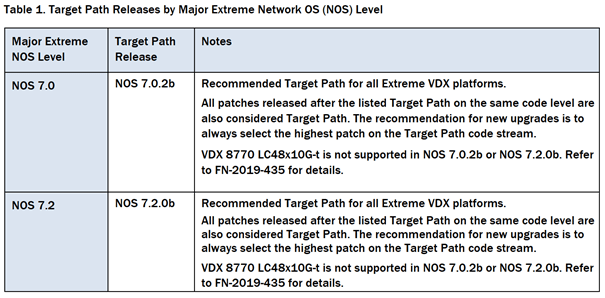
There is a table for updating in the release notes of each firmware. According to this table, it will be clear how to update. According to the table below in the release note of NOS 7.2.0b, ISSU update from NOS 6.0.2x to NOS 7.2.0x is not possible, a three-step update can be done with coldboot. If the firmwares are to be passed directly, the Default-config option must be selected.
Three step update with coldboot option:
i) First switch from NOS6.0.2x to NOS7.0.1x using the coldboot option
ii) Then switch from NOS7.0.1x to NOS7.1.0x using the coldboot option
iii) You can then switch from NOS7.1.0x to NOS7.2.0b using the coldboot option.

The principle switch has a > sign in front of the WWN number.
RB1_SW# sh vcs
Config Mode : Distributed
VCS Mode : Logical Chassis
VCS ID : 100
VCS GUID : yyyy23b6-aaaa-bbbb-cccc-ddddxxxx889
Total Number of Nodes : 2
Rbridge-Id WWN Management IP VCS Status Fabric Status HostName
——————————————————————————————————————————–
1 >10:00:XX:XX:XX:XX:XX:Y1* 172.17.X.Y1 Online Online RB1_SW
2 10:00:XX:XX:XX:XX:XX:Y2 172.17.X.Y2 Online Online RB2_SW
12) Odd & Even Approach are determined as two SETs. For uninterrupted updating, servers should be redundantly connected to Leaf switches.
SET2: RB12, RB14, RB2
SET1: RB11, RB13, RB1
Firmware Upgrade:
After the network switches are divided into SET1 and SET2, the group containing the Principle switch should be made last. In our example, SET2 must be updated first. Two different update methods are possible with minimal disruption.
i) In this method, the update is done by relying on the capabilities of the vlag ignore-split command without requiring any extra configuration. I prefer to use this method when FCOE/FC port is not used.
ii) In this method, there is an interruption during shutdown, no shutdown, two primary ports are not used at the same time. Static and dynamic vlag also work smoother.
NOTE: Console and telnet accesses should be checked before all operations.
FIRST UPGRADE METHOD:
i) SET2: RB2, RB12 ve RB14
RB1-SW# ter mon
Terminal monitoring is enabled.
In order to start the firmware update process on VDX switches, the following command is entered, after the information is checked, the update is continued by entering y. Optionally, nocommit (commit) and noreboot (reboot) can be entered as parameters.
RB1-SW# firmware download logical-chassis tftp host <TFTP-SRV-IP-ADD> directory /firmware/nos7.1.0b2 file release.plist rbridge-id 2,12,14 coldboot
Following is the result of the sanity check on the specified nodes.
Rbridge-id Sanity Result Current Version
————————————————————–
2 Disruptive 7.0.1c1
12 Disruptive 7.0.1c1
14 Disruptive 7.0.1c1
You are invoking firmware download with the coldboot option. This command will download the new firmware to the specified nodes, and cause cold reboot.
Do you want to continue? [y/n]:y
ii) Firmware update process can be followed with the command below for the desired RB. The firmware update process will take about an hour. The message downloaded successfully should appear for SW/0 and SW/1 (two flash disks).
RB1-SW# show firmwaredownloadstatus rbridge-id 2
[1]: Mon Oct 7 20:02:31 2019
Slot SW/0: Firmware install begins.
[2]: Mon Oct 7 20:24:08 2019
Slot SW/0: Firmware install ends.
[3]: Mon Oct 7 20:24:08 2019
Slot SW/1: Firmware install begins.
[4]: Mon Oct 7 20:30:29 2019
Slot SW/1: Firmware install ends.
[5]: Mon Oct 7 20:33:32 2019
Slot SW/0: Firmware starts to swap.
[6]: Mon Oct 7 20:33:32 2019
Slot SW/1: Firmware starts to swap.
[7]: Mon Oct 7 20:33:36 2019
Slot SW/1: Firmware is swapped.
[8]: Mon Oct 7 20:33:46 2019
Slot SW/0: Firmware is swapped.
[9]: Mon Oct 7 20:33:46 2019
Slot SW/1: The blade begins to reboot.
[10]: Mon Oct 7 20:45:36 2019
Slot SW/1: The blade is rebooted.
[11]: Mon Oct 7 20:45:36 2019
Slot SW/0: The blade begins to reboot.
[12]: Mon Oct 7 20:52:36 2019
Slot SW/0: The blade is rebooted.
[13]: Mon Oct 7 20:52:36 2019
Slot SW/0: Firmware commit begins.
[14]: Mon Oct 7 20:52:36 2019
Slot SW/1: The blade is rebooted.
[15]: Mon Oct 7 20:52:36 2019
Slot SW/1: Firmware commit begins.
[16]: Mon Oct 7 21:01:49 2019
Slot SW/1: Firmware commit ends.
[17]: Mon Oct 7 21:01:50 2019
Slot SW/1: Firmware is downloaded successfully.
[18]: Mon Oct 7 21:02:10 2019
Slot SW/0: Firmware commit ends.
[19]: Mon Oct 7 21:02:10 2019
Slot SW/0: Firmware is downloaded successfully.
iii) After SET2 Firmware update, SET2 members will have VCS status offline due to firmware mismatch. Server connections will continue to work because the “vlag ignore-split” command is entered.
RB1_SW# sh vcs
Config Mode : Distributed
VCS Mode : Logical Chassis
VCS ID : 100
VCS GUID : yyyy23b6-aaaa-bbbb-cccc-ddddxxxx889
Total Number of Nodes : 6
Rbridge-Id WWN Management VCS Fabric HostName
IP Status Status
——————————————————————————–
1 >10:00:XX:XX:XX:XX:XX:Y1* 172.17.X.Y1 Online Online RB1_SW
2 10:00:XX:XX:XX:XX:XX:Y2 172.17.X.Y2 Offline Online RB2_SW
11 10:00:XX:XX:XX:XX:XX:Y3 172.17.X.Y3 Online Online RB3_SW
12 10:00:XX:XX:XX:XX:XX:Y4 172.17.X.Y4 Offline Online RB4_SW
13 10:00:XX:XX:XX:XX:XX:Y5 172.17.X.Y5 Online Online RB5_SW
14 10:00:XX:XX:XX:XX:XX:Y6 172.17.X.Y6 Offline Online RB6_SW
All switches in SET2 wait to join VCS. VCS Status will be online when firmware update is done in SET1 group.
RB2_SW# sh vcs
Config Mode : Distributed
VCS Mode : Logical Chassis
VCS ID : 100
VCS GUID : yyyy23b6-aaaa-bbbb-cccc-ddddxxxx889
Rbridge-Id WWN Management VCS Fabric HostName
IP Status Status
———————————————————————-
- 10:00:XX:XX:XX:XX:XX:Y2* 172.17.X.Y2 Awaiting Rejoin Online RB2_SW
At this time, a record like the following output can be seen in SET1. The schema mismatch error states that SET1 and SET2 are in different firmware and will not appear again when the two SETs are synchronized.
2020/09/25-22:58:00 , [VCS-1006], 404095, M1 | Active | VCS RID1, ERROR, BACKBONE-1, Event: VCS node rejoin, Coordinator IP: (null), VCS ID: 10, Status: rBridge ID 2 ((null)) failed to rejoin VCS cluster, Reason: There is schema mismatch.
SECOND UPGRADE METHOD: (Graceful shutdown):
In this method, the cluster is again divided into SET1 and SET2. While the SET’s firmware is being updated, all ports facing the servers are shut down. Switches are accessed through the management port.
After the firmware update is finished and the SET is rebooted and opened, the ports are opened and the ports of the other SET are closed. After the other SET is updated and rebooted, all ports of the SET are opened. The cluster will be running in the same firmware.
In this method, there will be an interruption in the shutdown, no shutdown interval.
i) Server ports are shut down in leaf switches in SET2 (non-SET2 coordinator group). The servers are disconnected from SET2.
conf t
int te 12/0/1
shut
int te 14/0/1
shut
ii) All ISL ports in SET2 to SET1 are shutdown. Thus, SET1 and SET2 are separated from each other.
iii) SET2 firmware is updated.
firmware download logical-chassis tftp host <TFTP-SRV-IP-ADD> directory /firmware/nos7.1.0b2 file release.plist rbridge-id 2,12,14 nocommit
via usb flash:
firmware download usb directory nos7.1.0b2 nocommit
NOTE:
When “nocommit” parameter is entered, it provides “rollback” without updating again in case of a problem.
iv) Since SET1 and SET2 have different firmware when the switches are turned on, the cluster will not be established.
v) All server and ISL ports of SET1 will be shutdown and on the other hand, ports of SET2 will be “no shutdown”. There will be an interruption at this time.
vi) Firmware will be updated. After the reboot, the cluster will form again.
vii) Necessary checks are made and the firmware is committed. After committing, the old firmware can only be restored by downloading.
firmware commit
Control:
show fabric all
show fabric isl
show fabric islports
Rollback:
Uncommitted old firmware can be reverted with a reboot. This command will reboot the switch and revert to the old firmware. If it is committed, the firmware must be reinstalled.
firmware restore
 Notes to Myself